 Archiving in Yoda
Overview
This is the Archiving Data in Yoda page, part of VU Tools → Yoda in the A-LIFE RDM collection.
 Complete these two mandatory pre-steps BEFORE submitting to the Vault for archiving in Yoda:
 PRE-STEP — MANDATORY | Complete the Yoda Metadata Form
 PRE-STEP — MANDATORY | Add a README file to your data package
This page guides you through submitting your data package to the Yoda Vault and covers:
Supporting materials: Best Practices — Metadata checks for archiving in Yoda
Authors: Irene Martorelli, Brett Olivier — Last modification: 2026-06-27 — Version: 1.2.1
 What is archiving in Yoda?
In Yoda, archiving and publishing are two distinct steps — unlike some repositories such as Zenodo, where both happen simultaneously when you publish a record:
- Archiving — submitting a data package to the Vault creates a read-only, long-term copy of your folder. Once accepted into the Vault, a data package cannot be changed or deleted. The data is securely preserved but not publicly accessible.
- Publishing — a subsequent, optional step that makes your data (or its metadata) publicly visible and assigns a DOI.
According to the VU Research Data and Software Management Policy (2024)1 (NL), archived data and software must contain everything that supports the published result, including appropriate documentation and metadata, so that the research process is transparent and verifiable.
Archiving in Yoda follows a review process:
- You fill in the Yoda Metadata Form for the folder you want to archive.
- You submit the folder as a data package to the Vault.
- A data manager reviews the submission for completeness and compliance before a copy is moved to the Vault — they will either approve it or request changes.
- Once approved, the data package is stored as a read-only copy in the Vault and visible under the Vault tab.
You can only publish after archiving — archiving alone does not assign a DOI
In Yoda, publication is only possible for data packages that have already been archived in the Vault. Archiving always comes first — but archiving alone does not make your data public or assign a DOI. A DOI is only assigned when you proceed to the publishing step.
When should you archive?
It is strongly recommended to archive at the end of the research project or when an article is published that relies on the data as its source.2
 1. Pre-checks before submitting to the Vault
Before submitting, make sure you have completed the Metadata and Documenting Data steps, then go through the checklist below.
Checklist before submitting in the vault
- 1. The metadata form is complete
-
Make sure all required fields in the Yoda Metadata Form are filled in and correspond to the folder you want to archive. Follow the steps in the Complete the Yoda Metadata Form section of the Metadata and Documentation page.
-
2. The data package folder contains a README file
-
Include a README file documenting the content of the files and aligning with the metadata. See the Essentials - README for templates and tips.
-
3. The licence is adequate and aligns with your Data Package Access
-
If Restricted or Closed is selected, you are responsible for adding a custom
licence.txtfile. Make sure to take a look at Essentials - Licences for selected licences for Yoda. -
4. Your folder structure is well-organised and file names are clear
-
A consistent structure and descriptive file names make your dataset easier to review and reuse. See Organise your Data.
-
5. No sensitive data is included in open files
-
If your data is labelled Open, verify that no identifiable or sensitive information is included in any of the files.
-
6. Your collaborators have checked the submission
-
Before submitting, confirm with collaborators that everything in the folder is correct and ready for archiving.
-
7. Check for typos and broken links
- Review names, titles, and metadata fields for typos. Verify that any URLs (DOIs, repository links) resolve correctly.
 2. Submitting to the Vault
Once you have gone through the checklist and everything is in place, go to your Research Space in Yoda, navigate to Actions and click the Submit button.
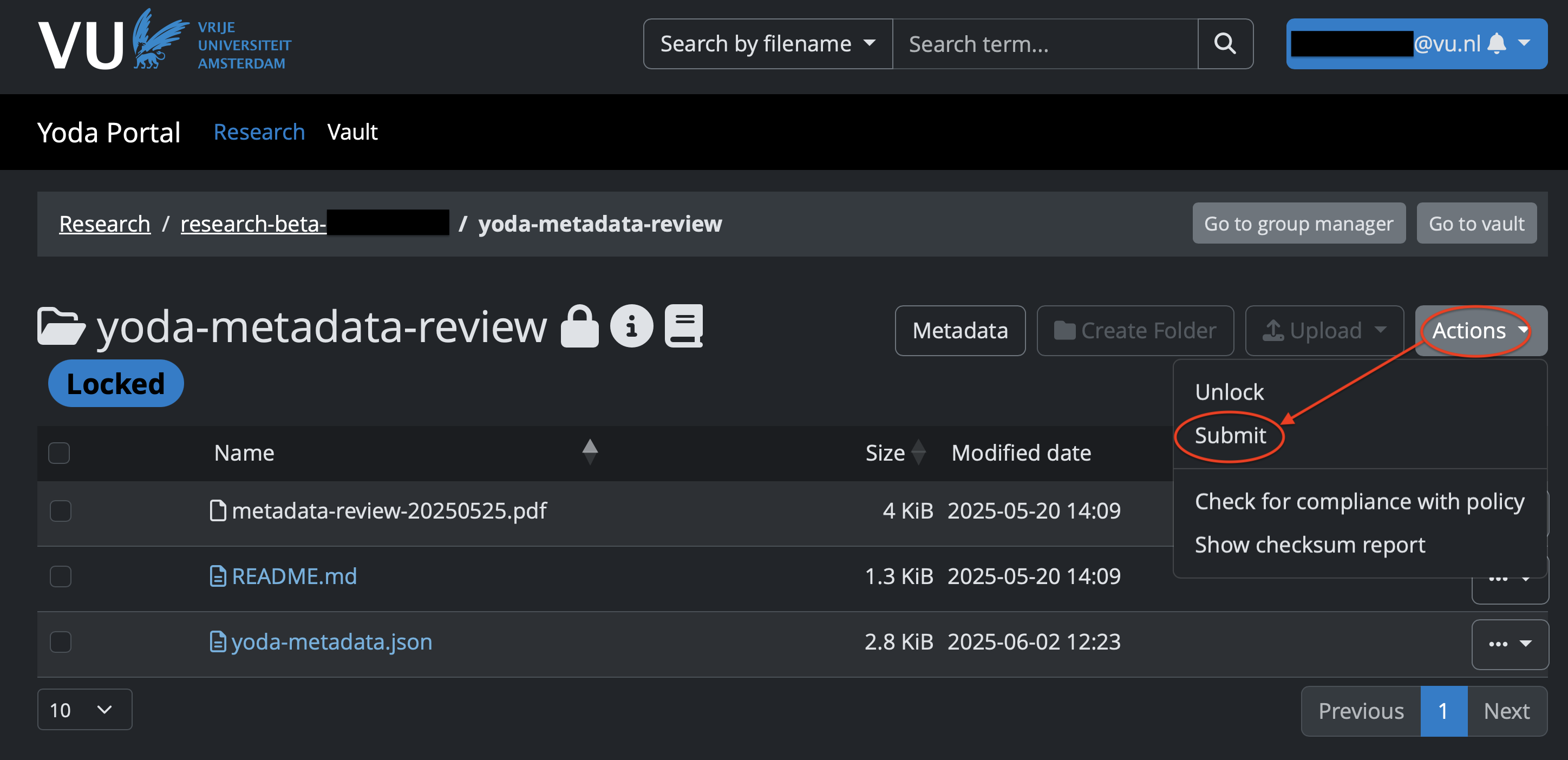
Submit will send the data package for review to the Institutional data manager. You will be notified by email once it is approved or when changes need to be made for approval.
When the data package is approved, the data folder will be visible in the Vault, the Yoda archive space.
 Important — do not forget to clean up your Research Space!
When your data package is accepted into the Vault, a copy of the folder is placed there — the original folder in your Research Space is not removed automatically.
 After archiving, go back to your Research Space and delete the folder you just archived. Do not delete any other folders — only the one that is now safely stored in the Vault.
What next?
Your data package has been submitted for archiving! Once approved, it will be visible in the Vault.
Are you ready to also publish your dataset? Follow Step 6 — Publishing in Yoda to make your data publicly available and receive a DOI!
Further reading
VU Research Support Handbook — Yoda — Archiving data
Utrecht University — Archiving your data in Yoda
-
VU Research Data and Software Management Policy (2024): https://rdm.vu.nl/public/policies-regulations/RDSM-policy-VU-EN-v3.0.pdf ↩
-
Utrecht University — Archiving your data in Yoda: https://www.uu.nl/en/research/yoda/guide-to-yoda/archiving-your-data-in-yoda ↩